Rotel Support
We are here to help you with any questions you might have about your Rotel products and devices, or we can offer insight into the world of sound and sound quality.
We are aware that some customers using Rotel products with DTS Play-Fi, such as the T14, have recently noticed changes to Internet radio availability within the Play-Fi app.
This update is the result of changes made by DTS Play-Fi to their platform. The previously integrated vTuner Internet radio service has been removed from the Play-Fi app and, where supported, replaced with TuneIn and other streaming services. These services, along with the Play-Fi app itself, are managed entirely by DTS Play-Fi and their licensing partners.
It is important to note that this change does not indicate any fault or performance issue with your Rotel product. The hardware continues to function as designed, including FM and DAB reception where applicable. The change only affects the selection of streaming services available within the DTS Play-Fi app.
What you should do
To continue enjoying Internet radio, we recommend the following steps:
Support and further information
As streaming services and app functionality are controlled by DTS Play-Fi, any questions relating to service availability, missing stations, or app behaviour are best directed to their support team: https://play-fi.com/faq/entry/customer-support-resources
Rotel remains committed to delivering high-quality audio products and will continue to support customers in navigating third-party platform changes where possible.
Rotel T14 and DTS Play-Fi Internet Radio Update
Q: Why has Internet radio disappeared from my T14?
A: DTS Play-Fi has removed the vTuner Internet radio service from its app. This change was made by DTS Play-Fi and is not controlled by Rotel.
Q: Is there a fault with my T14?
A: No. This is not a hardware issue. The change only affects streaming services within the Play-Fi app. FM and DAB functions are unaffected.
Q: Is there an alternative for Internet radio?
A: Where supported, TuneIn is available within the DTS Play-Fi app as a replacement service.
Q: What should I do?
A: Update the DTS Play-Fi app via the Apple App Store or Google Play Store, ensure your device is connected to your network, and check the available services within the app.
Q: Why are services changing?
A: Streaming services and availability are managed by DTS Play-Fi and their licensing partners. Rotel does not control these changes.
Q: Who should I contact for support?
August 13, 2024
There are several different speaker connecting methods to an amplifier or AV receivers, the choice of these methods can impact the sound quality and performance.
Bi-wiring and Bi-amping are the most common methods that both of them involve using separate cables for the high and low-frequency drivers of a pair of speakers.
Bi-Wiring
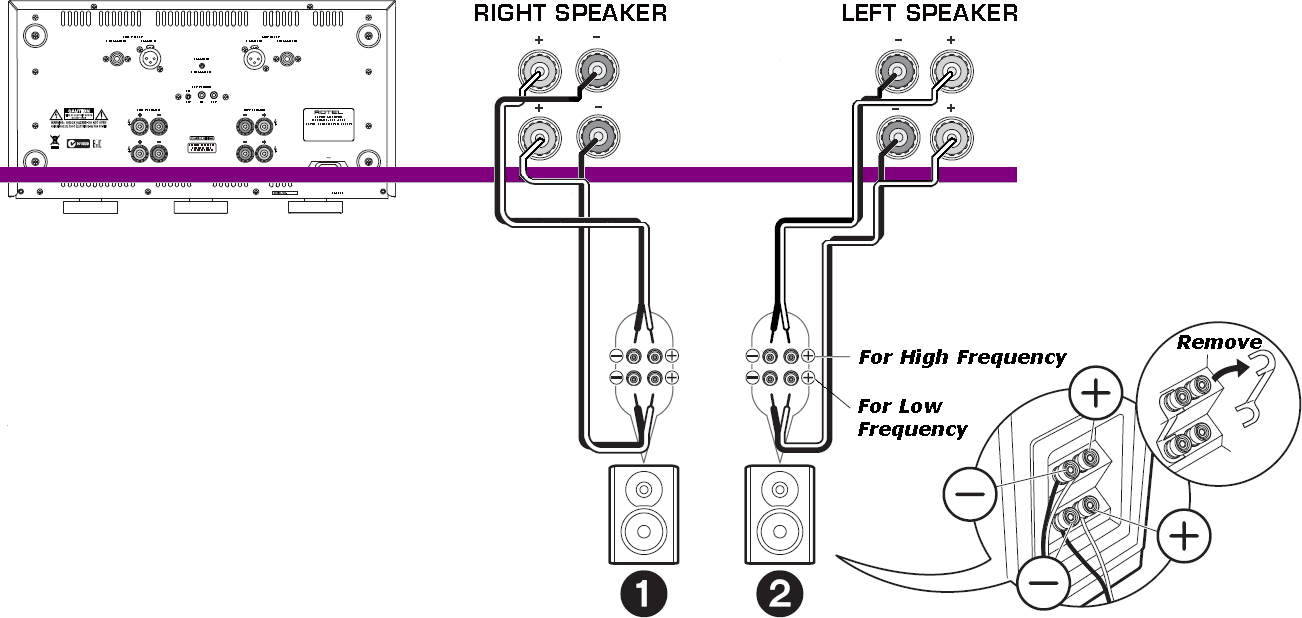
Bi-wiring only requires a single one audio amplifier channel, instead of using a single pair of wires to connect the amplifier to the speaker’s crossover, Bi-wiring would separate the audio signal into two separate frequencies bands and sends them through separate sets of wires, each set of wires can handle a narrow frequency to improve the sound quality (i.e., accurate and clear), but... it’s not necessarily a guaranteed way to improve sound quality.
Below is an example of Bi-Wiring speaker output connection to 1 unit of RB-1590 stereo power amplifier
Bi-Amping
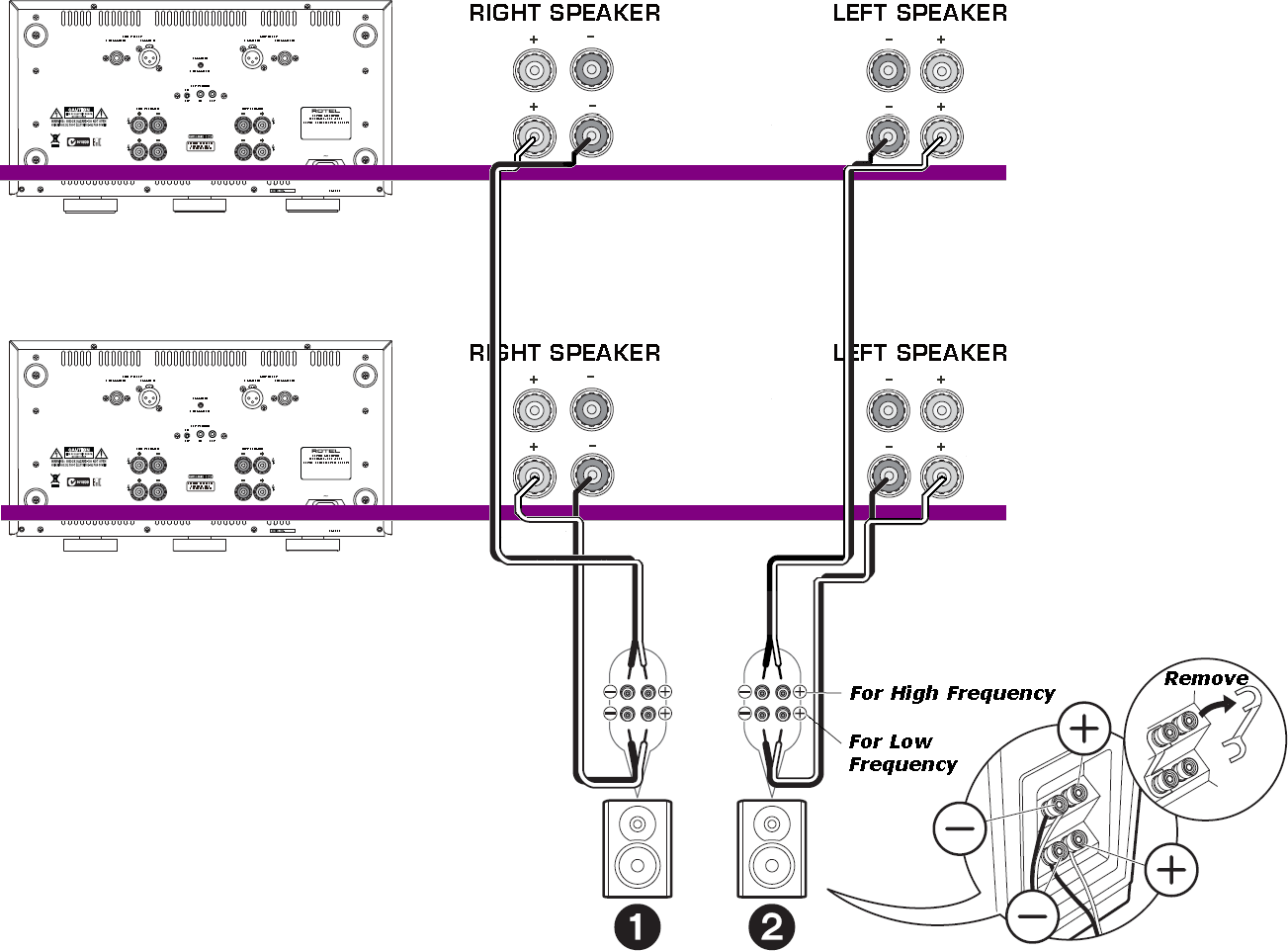
Whereas Bi-amping requires two separate audio amplifier channels that with each channel dedicated to a specific frequency range of the speaker, by using a separate audio channel for each frequency range, Bi-amping is designed to provide more power and precise control to improve the sound quality (i.e., dynamic range) and reduce inter-modulation distortion.
This method can also allow for better speaker matching, as each channel can be specifically chosen to match the frequency range of the driver it is powering.
Below is an example of Bi-Amping speaker output connection to 2 units of RB-1590 stereo power amplifier
In general, it would be worth experimenting with both above two methods to see which one provides the best sound quality for listener's particular setup with specified audio equipment.
July 25, 2024
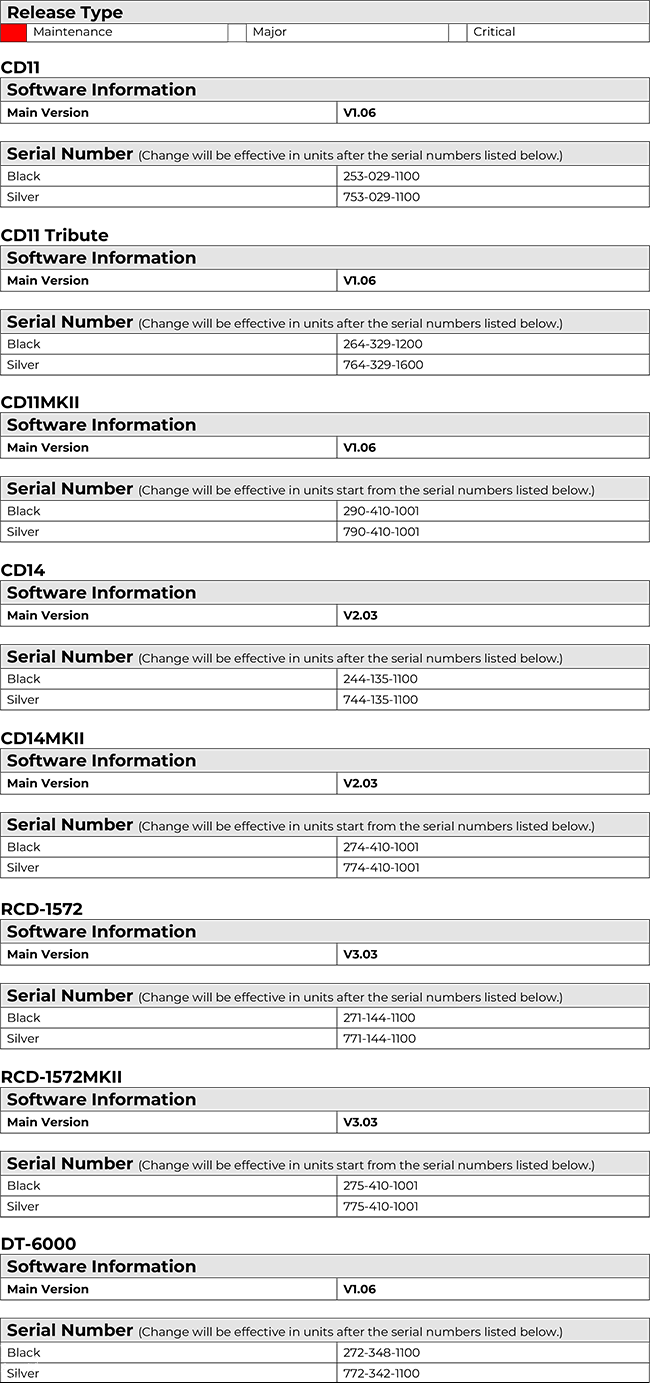
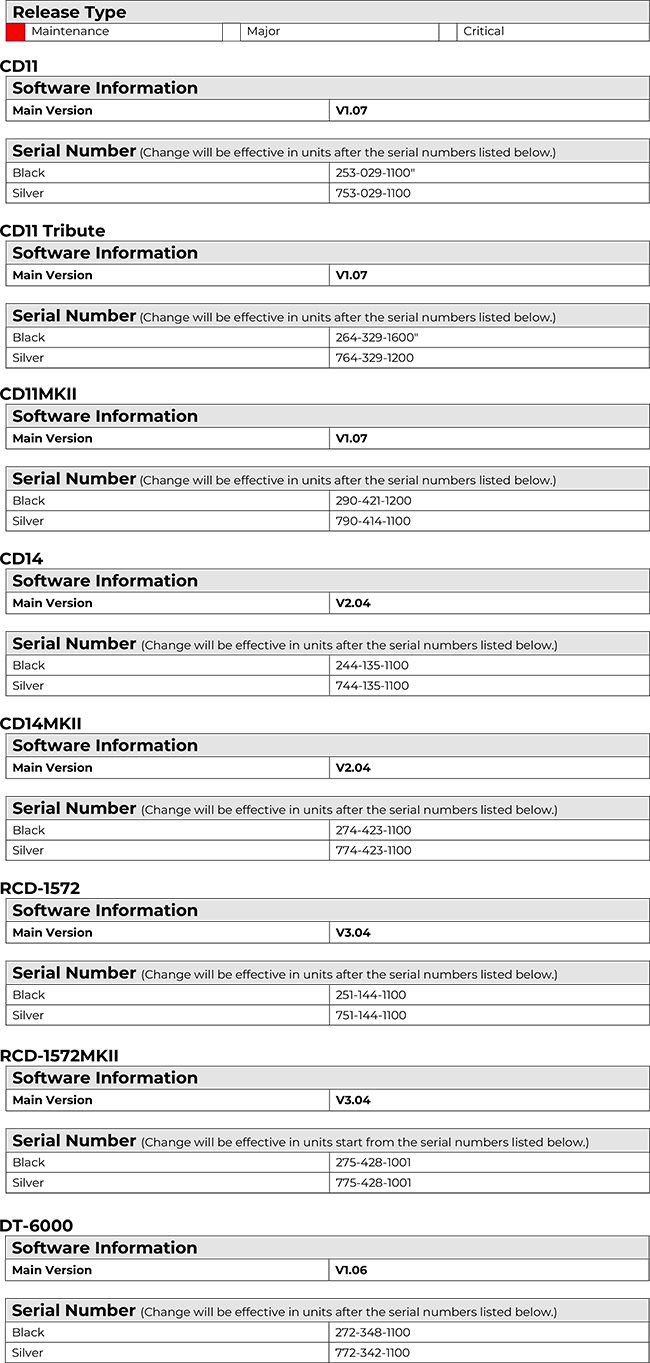
In above Rotel CD players, an annoying abruptly stopping issue has been identified in earlier developed software versions.
A rare but possible issue may occur if laser pick-up reads and reports wrong data during playback on some specified discs. If the error occurs the correction system could cause the CD player to mistakenly abort and stop the playback status.
This issue has been resolved in the latest released main software versions as listed below. New production starting with the serial numbers in the list already have the updated software installed at the time of production. Should you require this update in a CD player please contact an authorized Rotel dealer or authorized Service Center.
Affected unit models include: CD11, CD11 Tribute, CD11MKII, CD14, CD14MKII, RCD-1572, RCD-1572MKII, DT-6000
July 25, 2024
In above Rotel CD players, a random order algorithm issue has been identified in earlier developed software versions.
When the system completes the TOC reading and is ready to play, pushing the [RANDOM] button on IR remote enables random playback mode. The begins playback starting on the 1st track of CD album every time as below and not the first track in the random list.
Original Random Playback Order

Corrected Random Playback Order

This issue has been resolved in the latest released main software versions as listed below. New production starting with the serial numbers in the list already have the updated software installed at the time of production. Should you require this update in a CD player please contact an authorized Rotel dealer or authorized Service Center.
Affected unit models include: CD11, CD11 Tribute, CD11MKII, CD14, CD14MKII, RCD-1572, RCD-1572MKII, DT-6000
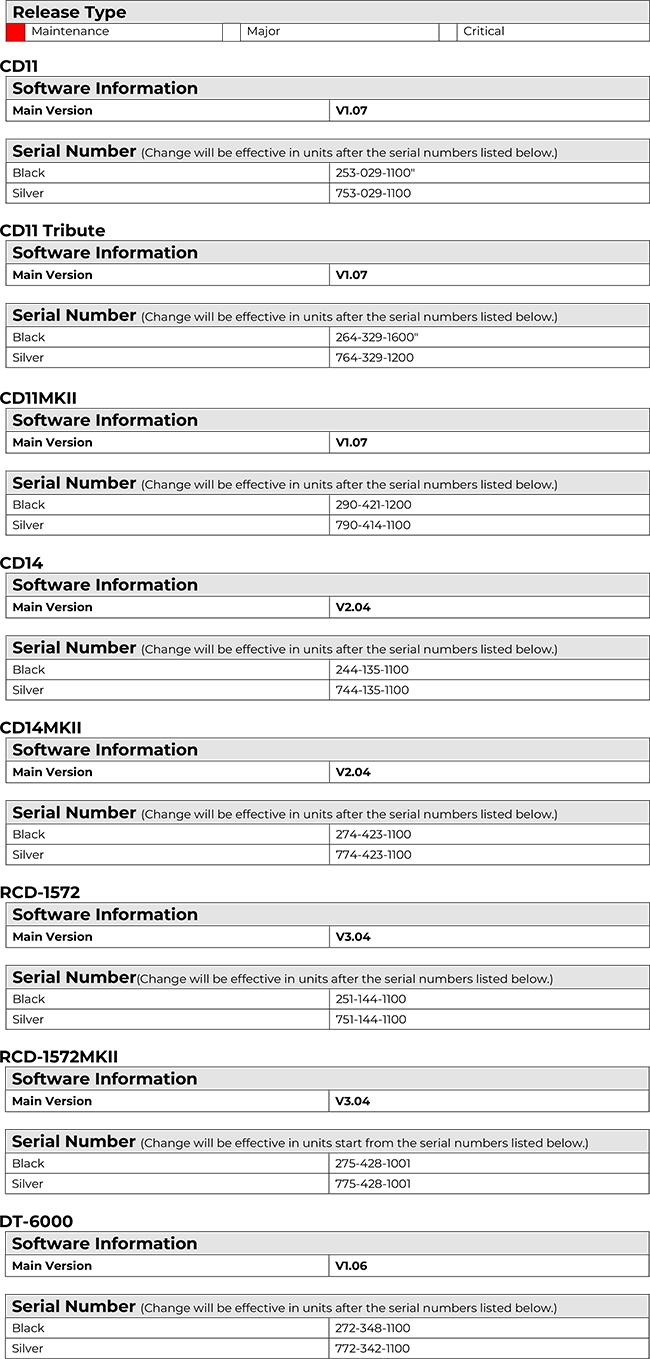
In above Rotel CD players, an annoying repeat endlessly last track issue has been found in earlier developed software versions.
The issue occurs after pressing the [<<] reverse search button on the remote during playback and allowing the unit to backward searches for a few seconds the restore normal playback When the device reaches the end of the CD album the system mistakenly repeats the last track endlessly instead of stopping playback.
This issue has been resolved in the latest released main software versions as listed below. New production starting with the serial numbers in the list already have the updated software installed at the time of production. Should you require this update in a CD player please contact an authorized Rotel dealer or authorized Service Center.
Affected unit models include: CD11, CD11 Tribute, CD11MKII, CD14, CD14MKII, RCD-1572, RCD-1572MKII, DT-6000
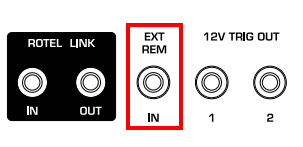
Most of Rotel products provide one 3.5mm mini-jack to receive command codes from industry-standard infrared receivers via hard-wired connections. This feature could prove useful when the unit is installed in a cabinet and the front-panel sensor is blocked.
Q: Where is the 3.5mm mini-jack on the unit?
The 3.5mm mini-jack is located on the EXT REM port of the rear panel.
Q: What’s the IR protocol used for Rotel products?
Most current Rotel products use NEC Hex codes as their standard IR library, the base hex library used for most receivers, preamps and integrated amps is NEC 8311, and current Rotel CD players is NEC 8312.
Q: What’s the NEC Protocol?
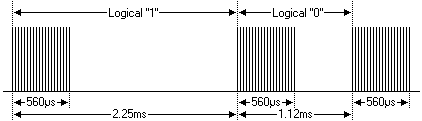
The NEC IR transmission protocol uses pulse distance encoding of the message bits. Each pulse burst is 560µs in length, at a carrier frequency of 38k Hz. A logical "1" takes 2.25ms to transmit, while a logical "0" is only 1.12ms.
Q: What’s the carrier frequency of the external IR receiver can be used for Rotel products?
Carrier frequency of external IR receiver that works with 38k Hz.
Q: How to connect the Rotel External IR Remote Control?
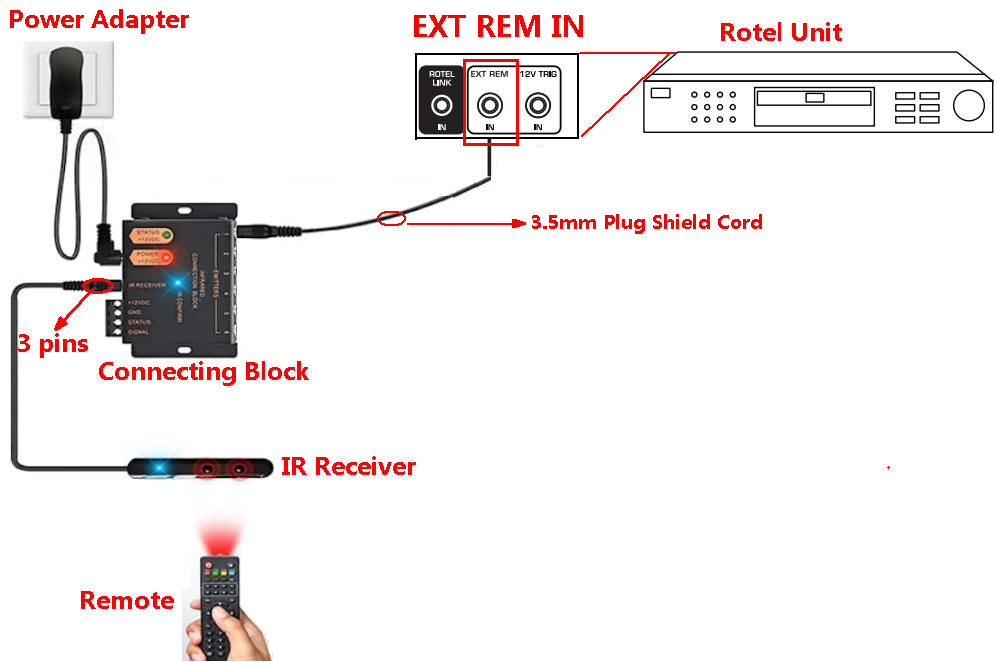
For standard Rotel products with IR Remote Input require power to the IR Receiver then convert the wireless IR signal to a wired data stream connected to the IR Remote Input on the device.
Below picture shows that External remote connection needs Power Adapter, Connecting Block (IR remote transceiver), IR Receiver (3 pins for power, ground and receiving IR) and one piece of 3.5 mm Plug Shield Cord.
Q: How to choose a Plug Shield Cord?
A 3.5 mm Plug Shield Cord 2-pin or 3-pin cable is required for connection to the Rotel unit for external IR remote connection.
For best performance and the highest streaming quality set the Rotel unit to use USB Audio Class 2.0 from the front setup menu. This will require installation of the Rotel USB driver on Windows based computers (no driver required for Mac) and a reboot of the computer and power cycle of the Rotel device.
You can find more information about installing the Rotel USB driver on this page: Rotel USB Drivers
The pass-through feature allows the audio signal from a Surround Receiver or Processor to pass through a separate stereo preamplifier without any signal modification. This is useful if you have a high-end two-channel system but want to watch video with surround sound on occasion.
To use the Bypass mode on the RC-1580, plug the front channel output of the surround sound processor into the Tape 2 inputs. When the Tape 2 input is selected, the signal from the processor is sent directly through the preamplifier and by-passes the tone and volume functions. Once the unit is in bypass mode, the BYPASS indicator on the front panel is turned on.
Setting a system up this way provides a way to integrate a stereo amplifier to be used as the front channels of a surround sound system. Only the Tape 2 input can provide the bypass function. It requires no additional setup, making it easy to switch between normal stereo mode and surround sound mode by using the input selector.
For information on Roon pricing please visit www.roonlabs.com.
扫一扫以下二维码或者搜索微信公众号即可关注,获取最新鲜的ROTEL资讯!
微信公众号:rotel-hifi